Frequently asked questions
Everything you need to know before you start.
Frequently asked questions
Do you have other questions? Contact us.
Installation & Setup
How do I install LocoPilote?
The Windows beta is not yet available for public download. Sign up on the Download page to receive the link as soon as it goes online. Installation will be guided and take less than 2 minutes.
Do I need to open ports on my router?
No. The application initiates the outgoing connection to the LocoPilote servers over HTTPS. No incoming firewall rule is needed.
Can I use LocoPilote on Mac or Linux?
LocoPilote is currently Windows only (10/11 64-bit). The account management interface works in all modern browsers. A macOS and Linux port is planned for 2027.
Subscriptions & Billing
How do I change plan?
From your customer area > Subscription, you can move up or down a plan. The difference is calculated pro rata for the current month.
Are there any commitment fees?
No. All plans are commitment-free. You can cancel at any time from your customer area, with no cancellation fees.
Which payment methods are accepted?
Card payment (Visa, Mastercard) via Stripe. SEPA transfer is planned for clubs with the Club plan, coming soon.
Technical
What is the latency between the command and the loco?
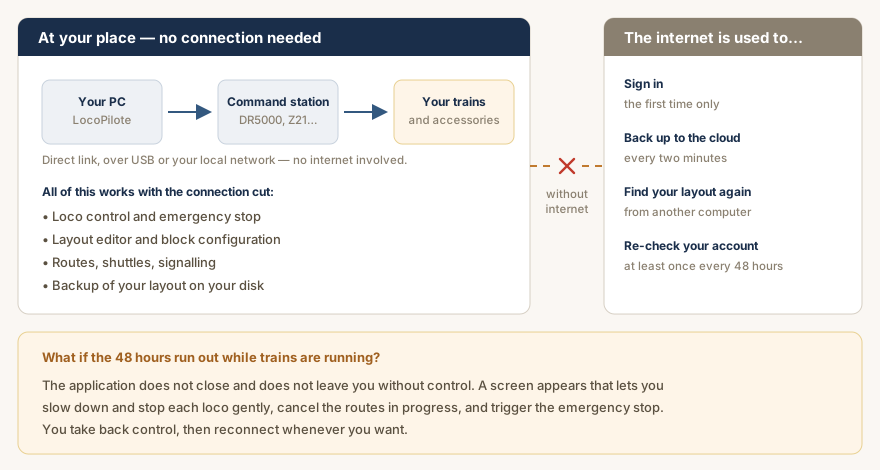
The DCC command goes directly from the application to the command station, over USB or your local network, without going through the internet. Latency is that of your local link — well below anything that would affect control.
Can the layout keep running if the internet drops during a session?
Yes. LocoPilote is a desktop application that controls your command station directly, without going through the internet. Loco control, emergency stop, editor, routes, shuttles, signalling: everything carries on. Only the copy to the cloud is interrupted — it resumes automatically on reconnection. Your project is stored on your disk; the cloud is a secondary copy. Good to know: if the application has been unable to contact the server for 48 hours, a reconnection is requested. If that deadline falls while trains are running, the application does not leave you without control — see the next question.
What happens if my session expires during an exhibition?
The application does not close and does not leave you without control. A screen appears that lets you slow down and stop each loco gently, cancel the routes in progress, and trigger the emergency stop. You then take back control, and reconnect whenever you wish.
How many locos can I control at the same time?
There is no software limit on the LocoPilote side. The limit comes from your DCC command station.